The short answer
- Place the device on the finger as shown in its instructions and remain still.
- Wait for the display to settle before recording the result.
- Ask your healthcare professional how they want you to interpret or report readings.
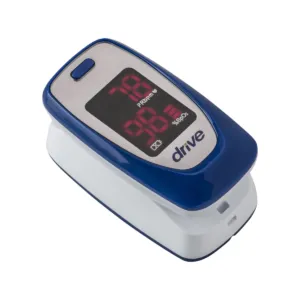
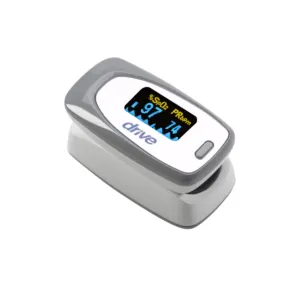
A fingertip pulse oximeter is a small device that uses light to display an estimate of blood oxygen saturation and pulse rate. It can be used at home when a healthcare professional recommends monitoring or when the user wants to record readings for discussion with their care team.
The device does not diagnose the cause of a reading. Ask your doctor or nurse what range they expect for you and what they want you to do if a result is different from that plan.
How do you place the pulse oximeter?
Open the device and place the finger inside as shown in the instructions. The finger should sit fully in the sensor area without forcing it.
Different devices may specify a preferred orientation, so check which way the display and sensor should face.
Why should you keep the hand still?
Movement can make it harder for the sensor to obtain a stable signal. Rest the hand comfortably and avoid moving the finger while the device is measuring.
If the display keeps changing rapidly or shows a signal warning, check the finger position and follow the troubleshooting instructions.
How long should you wait?
Allow the device enough time to obtain a stable reading according to its instructions. Do not record the first number that flashes on the display if it is still changing.
Some units show a pulse indicator or signal strength display that can help show whether the measurement is stable.
Can cold hands affect the reading?
Circulation at the fingertip and other factors can affect whether the device gets a clear signal. If the monitor cannot produce a stable result, follow its troubleshooting guidance.
Do not repeatedly interpret unusual results by yourself. Discuss ongoing measurement problems with a healthcare professional.
What about nail polish or artificial nails?
Some nail products or artificial nails may interfere with certain fingertip sensors. Check the device instructions for any restrictions or recommended finger placement.
If the device repeatedly fails to obtain a reading, try the troubleshooting steps listed by the manufacturer rather than assuming the displayed value is accurate.
What do the numbers mean?
The display commonly shows oxygen saturation and pulse rate. Your healthcare professional should explain what values they want you to monitor and what action they want you to take.
Do not use a general internet range to make medication, oxygen or treatment changes. Personal targets may differ.
Can the reading replace how you feel?
No home monitoring device should be used as the only basis for assessing a health problem. If you have symptoms or concerns, contact the healthcare professional responsible for your care according to the plan they have given you.
The pulse oximeter provides information that can be shared with that professional.
How should you record readings?
If your clinician has asked you to keep a log, record the information they request. Try to use the device under similar conditions so the record is easier to review.
If several people use the same oximeter, make sure records do not become mixed.
How should the device be cleaned?
Follow the manufacturer’s cleaning instructions. The sensor area should be kept clean without using liquids or chemicals that could damage the electronics.
Store the device in a dry place and replace batteries as directed.
What mistakes are common?
- Recording a number while the display is still changing.
- Moving the hand during measurement.
- Using the device without checking finger placement.
- Ignoring repeated error or low signal indicators.
- Making treatment or oxygen changes without professional guidance.
- Assuming one home reading explains a person’s symptoms.
What should you check before buying?
Look at display size, readability, battery type, finger size range and any signal indicator included by the device. Large, clear numbers may be particularly useful for people with limited vision.
Ask your healthcare professional whether they have specific requirements for the monitor you use.
If you are unsure which pulse oximeter features you need, call an Avante Shop specialist for help.
Questions people ask
Which finger should I use?
Follow the instructions for the specific oximeter and any directions from your healthcare professional.
Why does the number keep changing?
Movement, finger position or signal quality can affect the display. Keep still and follow the device troubleshooting steps.
Can nail polish affect a pulse oximeter?
Some nail products may interfere with certain sensors. Check the manufacturer's instructions.
Should I change my oxygen based on the reading?
Do not change prescribed oxygen or other treatment without instructions from the healthcare professional responsible for your care.
This guide is general product information, not medical advice. If you are unsure what is right, speak to your doctor, nurse or therapist.